Finance teams are under pressure to deliver deeper insights, faster reporting cycles, and more accurate forecasts. Yet despite investments in ERP and financial planning analysis tools, many organisations still find themselves relying heavily on Excel to fill the gaps. Why is this happening?
A major reason is that many finance teams aren’t clear on what each tool is designed to do. Business Central, Power BI, and Solver all play important roles in the Microsoft ecosystem, but they serve very different purposes. When those roles aren’t clear, teams end up misusing tools, over‑engineering processes, or creating unnecessary manual workarounds.
This guide breaks down what each platform is designed for, where each one excels, and how they complement each other in a modern finance tech stack.
What is the high level role of each platform?

Business Central is designed for ERP actuals, operational reporting & foundational budgeting
Business Central is your system of record. It’s where transactions live, where actuals are stored, and where operational data flows. Historically, its native reporting and budgeting tools were limited, which is why many finance teams exported data to Excel for anything beyond the basics.
However, Business Central has evolved significantly in recent years. Microsoft has introduced new AI-assisted reporting with Microsoft Copilot driven insights, and improved financial analytics experiences. These enhancements make Business Central more flexible and reduce some of the manual effort that used to be unavoidable.
Business Central is best for:
✔ Operational data
✔ GL level budgets
✔ Standard financial statements
✔ AI assisted insights and summaries
Business Central alone is not suitable for:
✖ Complex modelling
✖ Driver based forecasting
✖ Multi entity management reporting

Power BI is designed for analytics, dashboards & data exploration
Power BI is Microsoft’s enterprise analytics engine. It’s exceptional for dashboards, KPIs, drill downs, and visual storytelling. But it’s not designed for structured financial reporting or budgeting, and it requires data modelling skills that most finance teams don’t have.
Power BI is best for:
✔ Dashboards & visual analytics
✔ Operational reporting across the business
✔ Trend analysis & drill-downs
Power BI alone is not suitable for:
✖ Budgeting
✖ Forecasting
✖ Pixel-perfect Financial Statements

Solver is designed for financial reporting, budgeting, forecasting & consolidation
Solver is the finance owned planning and reporting layer that sits on top of Business Central. It fills the gaps that Business Central and Power BI can’t cover, especially around budgeting, forecasting, modelling, and management reporting.
Solver is best for:
✔ Driver-based forecasting
✔ Workforce, revenue, capex, balance sheet & cash flow models
✔ Multi-entity consolidation
✔ Pixel-perfect financial reporting packs
✔ Budget workflows & approvals
Solver alone is not:
✖ A dashboarding tool (that’s Power BI’s job)
A quick note on the Microsoft Fabric Planning (Planning IQ)
Earlier this year, Microsoft introduced Planning in Microsoft Fabric (Planning IQ), which is a new FP&A capability built directly into the Microsoft Fabric platform. It brings modelling, forecasting, and planning closer to the analytics layer and integrates tightly with Power BI.
It’s still early stage compared to mature FP&A tools like Solver, but it represents an exciting direction for Microsoft’s finance stack. We’ll be introducing Planning IQ in our upcoming webinar so finance teams can see where it fits in the broader ecosystem.
How Business Central, Power BI and Solver work well together
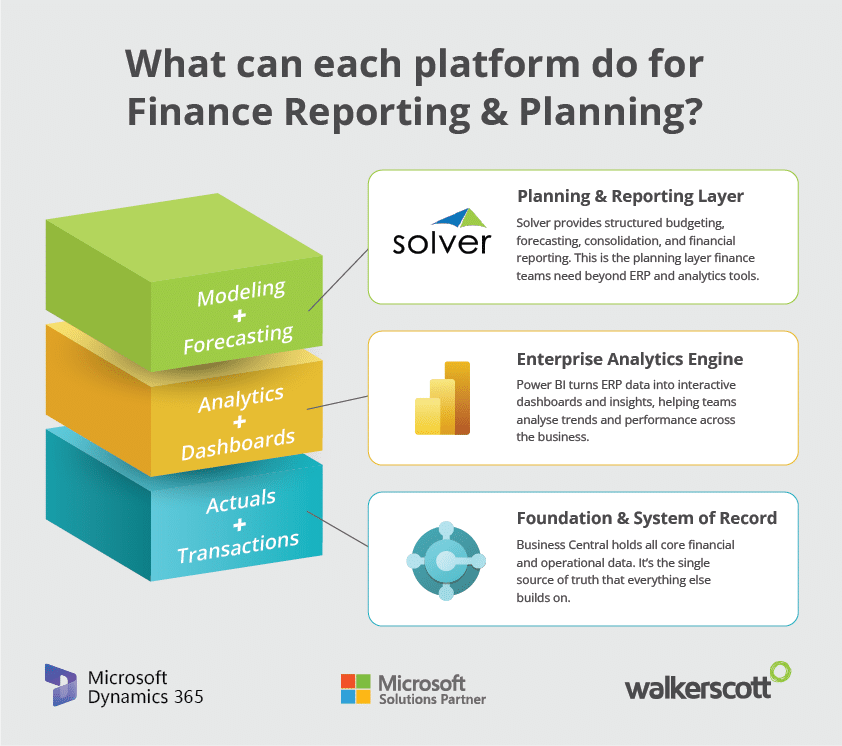
Think of the three tools as essential layers in a modern finance technology stack:
- Business Central → Actuals + transactions
- Solver → Planning + financial reporting
- Power BI → Analytics + dashboards
Together, they give finance teams a complete, automated, insight rich environment to work with.
Business Central vs Power BI vs Solver Comparison Table
Below is a high level comparison across the most important reporting and planning capabilities across all 3 platforms.
 Business Central |
 Power BI |
 Solver |
|
|---|---|---|---|
Financial Reporting |
Basic, rigid, often exported to Excel |
Not designed for financial statements |
Advanced, highly customised, pixel-perfect |
Management Reporting Packs |
Manual Excel work |
Possible but not ideal |
Purpose-built for board & departmental packs |
Operational Dashboards |
Limited |
Best-in-class dashboards & visuals |
Not a dashboard tool |
Drill-Down & Data Exploration |
Basic |
Excellent |
Good within structured reports |
Budgeting |
GL-level only, no modelling |
Not supported |
Full budgeting suite with templates & workflows |
Driver-Based Forecasting |
Not supported |
Not supported |
Revenue, workforce, capex, BS, CF modelling |
Multi-Entity Consolidation |
Manual |
Not supported |
Automated consolidation across entities |
Workflow Approvals |
Limited |
Not applicable |
Full workflow engine (submit, approve, reject) |
Excel Integration |
Export only |
Connects to Excel |
Excel-based report designer |
Data Modelling |
Minimal |
Requires DAX & modelling skills |
Finance-friendly modelling layer |
AI Capabilities |
Copilot for basic insights |
AI visuals & Q&A |
AI-assisted planning (depending on setup) |
Report Distribution |
Manual |
Manual |
Automated distribution to users |
Ease of Use for Finance Teams |
Moderate |
Low (requires technical skills) |
High (finance-owned) |
Best For |
Actuals & operations |
Analytics & dashboards |
Planning, forecasting & financial reporting |
What you can do to improve you finance reporting & planning capabilities in Business Central
If you’re relying on Business Central alone for reporting and budgeting, you’ll eventually fall back into Excel, not because Business Central is weak, but because ERP systems aren’t designed for modelling, forecasting, or multi entity reporting.
If you’re relying on Power BI alone, you’ll get great dashboards but no structured planning.
And without a top layer tool like Solver, you end up doing your modelling and forecasting manually in disconnected spreadsheets.
Use a Microsoft native, Business Central compatible tool like Solver to complete the FP&A toolkit your finance team needs for modelling, forecasting, consolidation, and financial reporting. Use Power BI for unrivalled analytics and dashboards. And keep an eye on Fabric Planning IQ as Microsoft continues to expand its native FP&A capabilities.
Together, these tools create a clean, automated, AI enabled finance environment that removes manual effort and helps you access deeper insight.
Find out more about FP&A, automation and AI driven finance functions in Business Central, watch our webinar recording below.
Finance Reporting & Planning in Business Central FAQs
We spend so much time exporting data from Business Central into Excel. Why is reporting still so manual?
This usually happens because Business Central’s native reporting is designed for operational accuracy rather than flexible financial analysis. It gives you the raw numbers, but not the formatting, modelling, or presentation layers finance teams need for management and board reporting. That’s why teams fall back to Excel, it’s the only place they can build the layouts, groupings, and calculations they need. Tools like Power BI and Solver sit on top of Business Central to automate this layer, giving finance teams the structure and flexibility they’re trying to recreate manually in spreadsheets.
Our budget process is slow and messy. Why is it so hard to manage inside Business Central?
Business Central’s budgeting module is functional but basic. It stores numbers at the GL level, but it doesn’t support the modelling logic that real budgeting requires – things like price volume drivers, workforce planning, capex and depreciation flows, or balance sheet roll forwards. Because of this, finance teams end up building everything in Excel and emailing templates around. A dedicated Microsoft native FP&A tool like Solver adds the modelling, workflow, and consolidation capabilities that Business Central doesn’t provide, making the budgeting cycle far more structured and efficient.
We’ve built dashboards in Power BI, but they don’t replace our financial reports. Are we missing something?
Not at all. Power BI is exceptional for dashboards, KPIs, and data exploration, but it isn’t designed to produce financial statements or board ready reporting packs. Financial reporting requires multi step calculations, strict formatting, commentary, and often multi entity consolidation – all things Power BI isn’t built for. This is why organisations typically use Power BI for analytics and a tool like Solver for structured financial reporting, with Business Central providing the underlying actuals.
How can we do driver based forecasting in Business Central or Power BI?
Neither Business Central nor Power BI includes a modelling engine. Driver based forecasting requires logic – price × volume, headcount × salary, capex → depreciation, balance sheet roll forwards, cash flow automation, and that logic needs to live somewhere. Business Central is an ERP, and Power BI is an analytics tool, so neither is designed for this. You will need an FP&A tool like Solver to provide the modelling layer that sits between Business Central and your analytics tools like Power BI, allowing finance teams to build structured, repeatable forecasting models.
We have multiple entities and currencies. Why is consolidation still so painful in Business Central?
Consolidation is difficult because it requires more than just adding numbers together. You need eliminations, currency translation, intercompany adjustments, and the ability to drill into entity level detail. Business Central doesn’t automate this, and Power BI can visualise consolidated data but can’t perform the consolidation itself. A top layer tool like Solver can automate multi entity consolidation in Business Central and give finance teams a controlled environment for group reporting, which removes a huge amount of manual work.
Our budget owners hate filling out spreadsheets. Is there a better way to collect inputs in Business Central?
Budget owners often struggle with spreadsheets because they’re easy to break, hard to version control, and don’t guide users through what they need to enter. Business Central doesn’t provide structured templates or workflows for budget submissions, so finance teams end up managing everything manually. FP&A tools like Solver give budget owners simple, guided templates with built in logic and validation, along with workflow approvals that make the whole process more transparent and less frustrating.
We want finance to be more strategic, but we’re stuck with manual processes in Business Central. What can we do to improve?
The bottleneck is usually the lack of a proper financial planning layer. Business Central handles transactions, and Power BI handles analytics, but the modelling, forecasting, and reporting work still happens in Excel. That means finance teams spend their time reconciling spreadsheets, chasing inputs, and rebuilding reports instead of analysing results. Introducing a planning tool to Business Central like Solver removes the manual work by centralising models, workflows, and reports, freeing finance teams to focus on insight rather than administration.
We’ve invested in Business Central and Power BI, shouldn’t that cover all our reporting needs?
Power BI is a powerful analytics tool, but it isn’t designed to replace financial reporting or budgeting. If you need departmental P&Ls, board packs, cash flow forecasts, or structured budget templates, Power BI won’t give you those out of the box. It’s best used alongside a planning and reporting tool like Solver, with Business Central providing the underlying data. Each tool plays a different role, and together they create a complete finance environment.