
How to move Not‑for‑Profit CRM or Fundraising & Donor Management systems safely, without losing data, supporters, donations, or uptime.
If you work in the Not‑for‑Profit sector in Australia, New Zealand, South East Asia, or the United Kingdom, you already know the anxiety that comes with switching CRMs. The idea of transitioning to a new Nonprofit CRM can feel paralysing, so much so that many organisations delay moving away from legacy systems, even when those systems are causing daily challenges. And with deadlines like Microsoft Fundraising & Engagement support ending 31 December 2026, the pressure to migrate is only growing.
Migrating systems requires careful planning and orchestration. Planning ahead helps you avoid nightmare scenarios like donor history disappearing, reconciliation breaking, mismatched data between CRM and finance systems, recurring gifts misbehaving, direct debit (Bacs) donors needing to reinstate payments, or teams being thrown into chaos during peak fundraising periods. These risks are real, but they are absolutely avoidable.
This guide walks through the key considerations, internal conversations, and practical steps that help your organisation plan a Not-for-Profit CRM migration safely and confidently. You may also find our Microsoft Fundraising & Engagement webinar recording below helpful as well.
1. Start with the project outcome, not the technology
Before discussing systems, features, or timelines, map out what your organisation needs to be able to deliver at the end of the project. Technology decisions become far easier when you’re clear on the operational outcomes that define success.
Your organisation may determine that a successful Not‑for‑Profit CRM migration is one where:
- Donor history is fully preserved
- Financial reconciliation remains accurate and predictable
- Compliance and regulatory reporting becomes faster, easier, and more self‑service
- Tax related receipting and audit trails remain intact (including Gift Aid eligibility and VAT considerations in the UK)
- Fundraising and finance teams gain clearer, more reliable data
Manual, time‑consuming tasks are automated (receipting, segmentation, workflows, reminders) - Teams have smarter, more accessible tools
- Supporter engagement becomes more consistent and personalised
- Donors experience zero disruption during the transition
- The organisation is ready for automation and AI‑driven insights
- Fundraising, grants, and finance data becomes more integrated and easier to govern
When you’re clear on these outcomes, every decision in your project like what to migrate, what to redesign, what to retire, all becomes simpler.
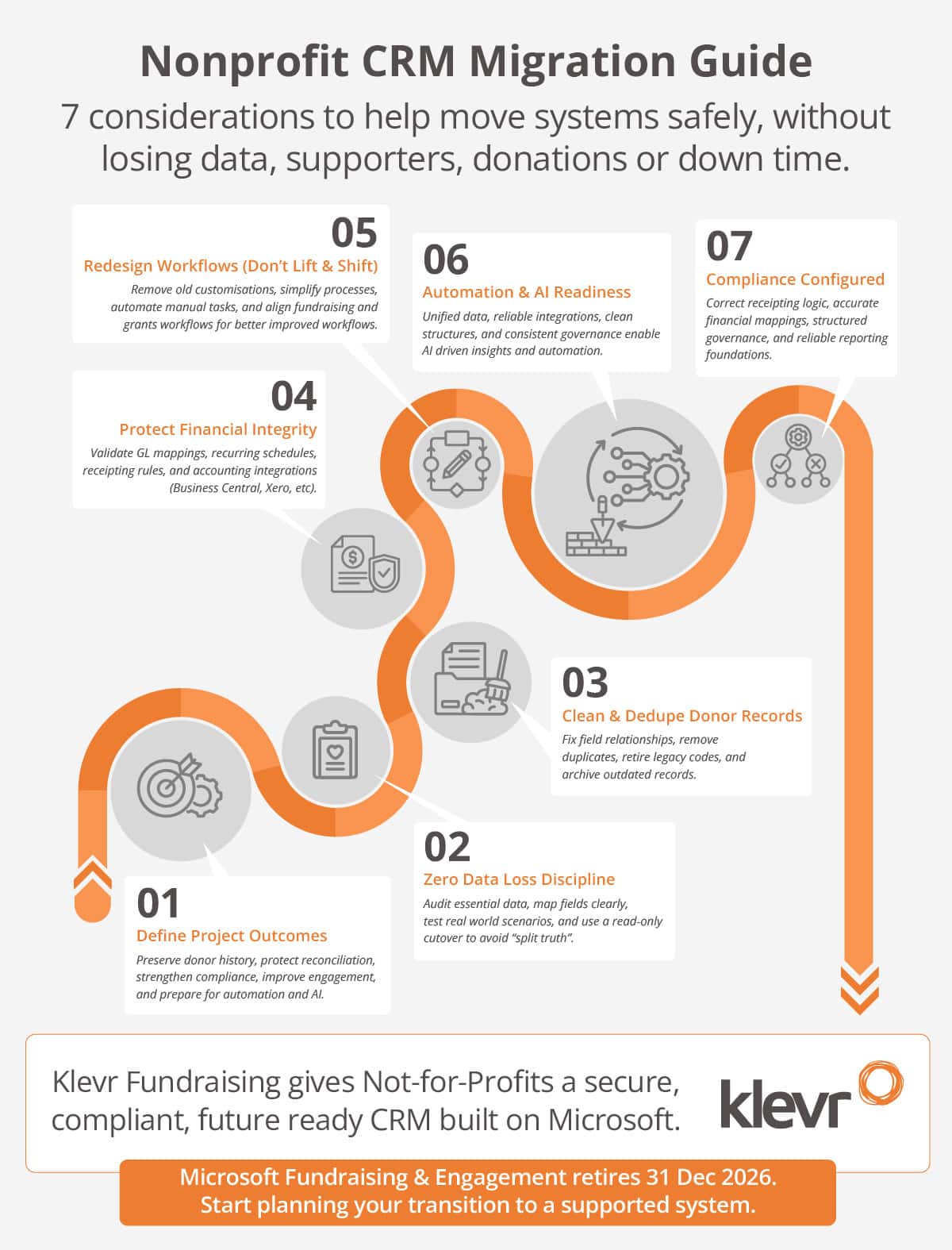
2. Zero data loss when you change CRM
Data loss is a major concern for many teams. Donor history drives ACNC AIS submissions, Charities Services Annual Returns, grant acquittals, donation receipting, audit trails, and Charity Commission Annual Returns in the UK. Zero data loss is achievable when treated as a discipline.
Putting in the extra effort here pays off in dividends later. Key considerations around moving your donor data:
- A proper data audit
Identify the data that truly matters like donor history, financial records, compliance critical fields, interaction notes. Separate essential data from duplicates, outdated codes, and legacy noise. Decide what moves, what is archived, and what is retired so your new CRM starts clean. - Clear mapping rules
Define how donors, households, gifts, pledges, recurring schedules, interactions, and grant notes translate into the new CRM. Not just where they go, but how they behave. This is foundational for financial accuracy and compliance. - Scenario based testing
Test using real world fundraising and finance scenarios. Validate recurring gifts, refunds, pledge schedules, receipting, grant acquittals, and reconciliation. Ensure data behaves correctly, not just appears correctly. - A read only period
Lock the old CRM during cutover so no new gifts or updates slip in unnoticed. This prevents timing mismatches and avoids “split truth” where some data lives in the old system and some in the new. Both systems run parrel like this until you are ready to decommission the old system.
3. Clean, Deduplicated Donor Records: The Accelerator for a better CRM
Once donor history is protected, the next priority is making sure the data is usable. Clean, well structured data will allow you to realise the full value of your new CRM. You have accurate segmentation, reliable automation, faster reporting, personalised engagement, and a strong foundation for AI.
Migration is a rare opportunity to fix long standing issues like tidy field relationships, resolve inconsistent naming conventions, retire obsolete codes, correct outdated contact information, and archive historical records that no longer serve reporting or compliance. A clean CRM is a powerful CRM.
4. Protecting Financial Integrity During CRM Migration
For most nonprofits, the donor CRM and finance system are tightly connected, and any CRM disruption affects reconciliation, receipting, recurring revenue, and compliance.
Financial integrity means:
- Gift batches reconcile cleanly
- GL mapping and fund accounting remain accurate
- Recurring schedules behave predictably, including Bacs Direct Debit schedules in the UK
- Receipting meets GST, BAS, DGR, and audit requirements; and VAT, VAT Return, Gift Aid, and audit requirements in the UK
- Accounting integrations (Business Central, Xero, etc.) sync reliably without timing mismatches
Payment processing is part of this picture too. If you’re moving away from a legacy merchant provider, you may need to migrate credit card tokens securely, re‑establish recurring logic, and validate settlement flows so donors never need to re‑enter card details.
5. Workflow Redesign: Don’t Lift and Shift Old Problems
A CRM migration is one of the few moments where you can rethink how your organisation actually works. Simply lifting and shifting legacy workflows into a new system recreates old problems in a new environment.
Use this moment to:
- Simplify overly complex steps
- Remove unnecessary customisations
- Align processes to best practice
- Automate manual tasks
- Unify fundraising and grants workflows
Skipping workflow redesign means rebuilding the same inefficiencies inside a brand new system. Taking the time now to modernise processes is one of the highest value parts of the migration process.
6. Automation and AI Readiness in your new CRM
Whether you’re already using AI or just beginning, the real value comes from connected, clean data and modern workflows.
A successful migration gives you:
- Unified donor and interaction history
- Reliable integrations
- Consistent reconciliation
- Clear governance
- Clean, structured data
With these foundations, AI becomes genuinely useful:
- Predictive donor insights
- Churn and upgrade scoring
- Automated segmentation
- Natural language reporting
- AI assisted gift processing
- Intelligent supporter journeys
Your CRM migration is the moment where these AI capabilities become possible.
7. Compliance Configured into your CRM
Compliance cannot be checked at the end of the migration, it must be designed into the CRM from day one. Nonprofits operate under strict reporting, receipting, privacy, and audit requirements, all of which depend on how your CRM stores data, applies rules, and generates financial outputs.
Key considerations include:
- Correct receipting logic
Tax deductible, non‑deductible, and split gifts must follow the right rules. - Accurate financial mappings
GL codes, fund allocations, and VAT treatment, Gift Aid rules, and HMRC compliance requirements in the UK - Structured data governance
Permissions, audit trails, and privacy controls must be intentional. - Reliable reporting foundations
Compliance reports depend on clean, structured, correctly mapped data. - Integrated finance workflows
CRM and accounting systems must align to avoid compliance breaking mismatches.
When compliance is built into the migration design, you protect obligations such as ACNC AIS submissions, Charities Services Annual Returns, DGR receipting, XRB Tier 3/4 reporting, and privacy requirements, as well as Charity Commission Annual Returns, HMRC Gift Aid claims, and VAT reporting obligations in the UK.
Transitioning to a new Donor Management CRM helps you protect donor trust, strengthen compliance, reduce manual effort, and access modern capabilities like automation and AI.
If your organisation is considering a Not for Profit CRM migration, now is the time to start planning. Walkerscott specialises in helping nonprofits migrate safely, cleanly, and confidently within the Microsoft ecosystem. Learn more about our Not for Profit CRM solution, Klevr Fundraising.