
If you manage a contact centre, you’ve likely felt there is a huge disconnect between the “AI revolution” promised in AI toolkit demos and the reality your agents face when using your current customer service platforms. How are you using AI in your contact centre right now?
You may have added new AI powered tools like a chatbot, a sentiment dashboard, or perhaps a new CRM layer to your customer service tech eco system. Yet, your agents are still juggling six open tabs or windows, and your customers are still repeating their life stories to three different people.
The truth is the problem isn’t your agents, and it isn’t your lack of effort. It’s a legacy technology architectural “Tax” you are paying every single day.
Your Contact Centre Solution was built by accretion, not by design.
Most legacy contact centre solutions weren’t “architected”, but rather they grew like a patchwork quilt. Voice was the foundation, then email was added, then SMS and chat were bolted on as expanding “digital channels”.
Every new channel brought its own solutions vendor, its own data silo, and its own login.
Today, research shows that 60% to 80% of the average contact centre’s IT budget is spent simply keeping these fragmented systems from falling apart – ie. maintenance.
The “Frankenstein AI” problem your customer service centre faces now
When you add AI to a fragmented tech stack, it doesn’t fix the cracks, it inherits them.
We see this everywhere:
- Blind AI IVRs: A generative voice menu that can’t see the customer’s open case history.
- Siloed Sentiment: Analytics that can tell you a customer is angry on Chat, but has no idea they were happy on Voice ten minutes ago.
- Context Free Copilots: An AI assistant that gives an agent “advice” based on incomplete data because it can’t read the legacy CRM and telephony system at the same time.
If your customer contact centre data layer is fractured, your AI will be too.
Adding tools to a disconnected ecosystem and expecting them to perform and talk to all your existing platforms, is an expensive mistake.
From “Bolted On” AI to “Built In” Embedded AI
A modern contact centre doesn’t treat AI or telephony as an “add-on.” It treats them as part of the fabric. Imagine an environment where:
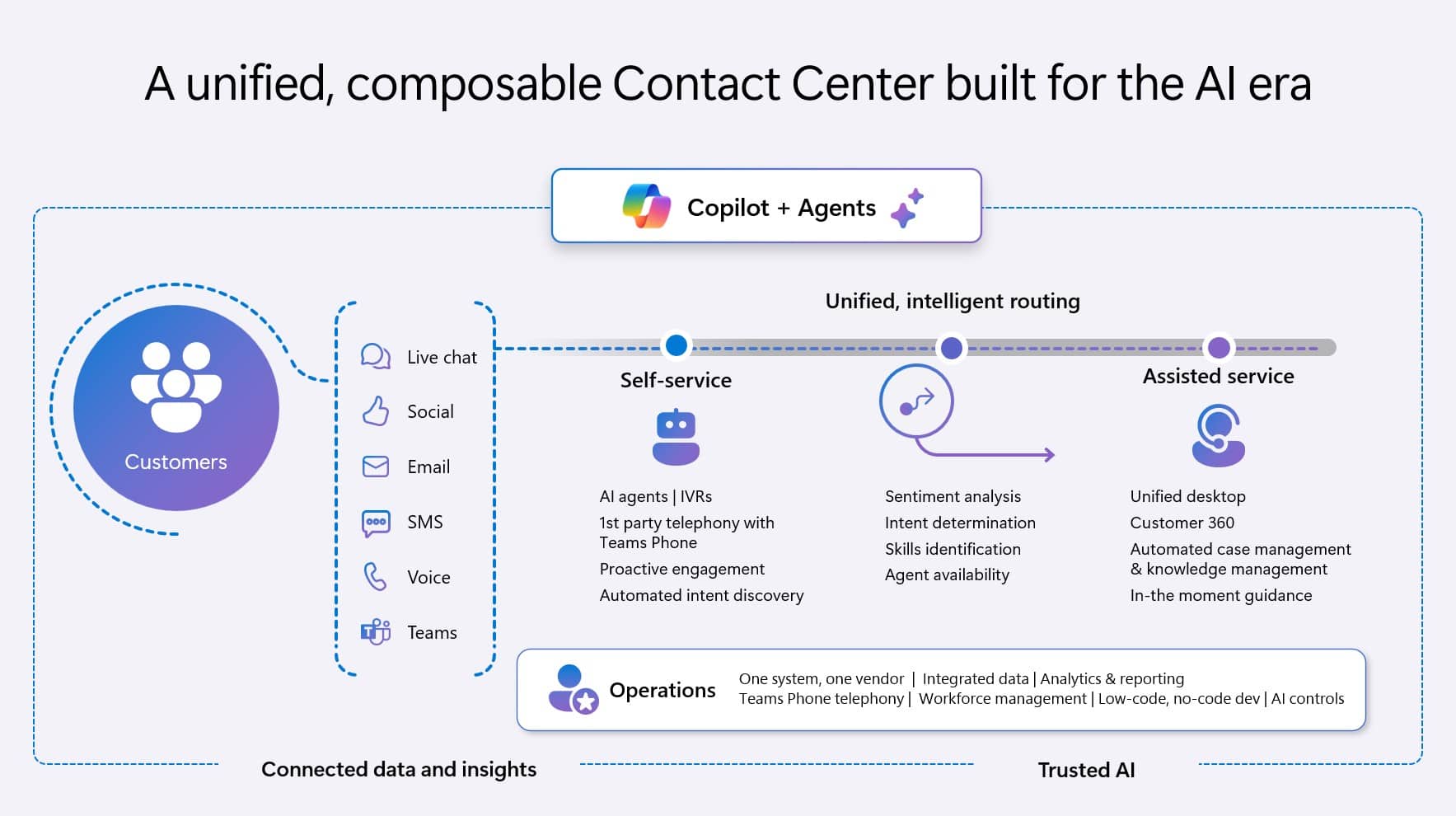
- Unified History: An agent answers a call and instantly sees every interaction across every channel, no searching, no switching windows.
- Automated Labour: The system captures the conversation and writes the after call notes automatically, because the telephony and CRM are the same system.
- Intelligent Routing: Customers are routed based on their real time context and history, not just the “next available” agent.
This isn’t a futuristic dream, it’s what happens when you stop managing a “disconnected tech stack” and start running a unified platform like Microsoft Dynamics 365 Contact Center.
Dynamics 365 Contact Center Solution for your Customer Service AI Strategy
Quit Tasmania switched to a unified Dynamics 365 Contact Center Solution

Quit Tasmania (sister organisation to Cancer Council Tasmania), a counselling service, faced this exact fragmentation. They were running Salesforce but struggled with disconnected voice, SMS, and email channels.
Working with Walkerscott, they didn’t just “add a tool.” They migrated to a unified foundation that connected their core channels and introduced automated quality feedback they never had before.
How to fix your Contact Centre Data & System Foundation
If your technology budget is being swallowed by IT maintenance, you don’t have the capacity to innovate. The longer you wait to fix the system architecture, the more expensive the “fix” becomes as you add more disconnected tools.
Our half-day Contact Centre workshop is designed to help you name the problem. We map your current state, identify where your data is leaking, and provide a blueprint for a modern, connected contact centre system architecture.
Book your Contact Centre workshop today.